Tokens and Pricing
Now that we have a general understanding of how AI models work, let’s explore what helps us understand not only how these models “think”, but also how much their usage costs: tokens.
Tokens can be thought of as “words” that AI models actually understand. But there’s a nuance: these are not exactly the words we use ourselves.
Just like your computer, which doesn’t actually understand the letter “A” but works with binary code (1s and 0s), AI models don’t directly operate with words like “hello” or “world.” Instead, they break everything down into smaller pieces — tokens.
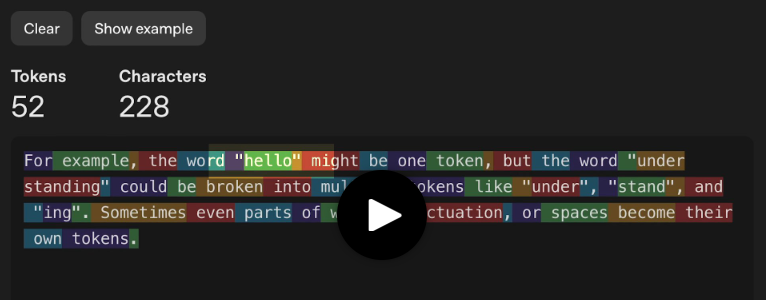
For example, the word “hello” might be one token, while “understanding” could be several: “under,” “stand,” and “ing.” Sometimes even parts of words, punctuation marks, or spaces become separate tokens.
Run a prompt and enable tokenizer viewStart
What are some tips for providing better context when working with AI coding assistants? Be concise.
Why is this important? For two reasons:
- Pricing is calculated per token. You pay for tokens, not for words or characters.
- Model speed is measured in tokens. Faster models have higher TPS — tokens per second — returned to the user.
Let’s first discuss pricing, since it directly affects your costs when using AI models.
What Are Tokens
If we continue the analogy with APIs, tokens are the units we use to measure and bill incoming and outgoing traffic.
AI models bill based on two types of tokens:
- Input tokens — everything you send to the model: your prompt and the previous conversation context.
- Output tokens — everything the model returns to you in response.
Output tokens typically cost 2–4 times more than input tokens, because generating new content requires more computational resources than simply processing what you sent.
Since AI models are billed per token, understanding them is key to managing costs — it’s like knowing how much your server costs.
It’s important to consciously choose the amount of information in your initial context (to which we’ll return later) and how you direct the model so that responses are either concise or detailed.
Streaming Responses
Have you noticed how ChatGPT and other AI chatbots seem to “type” responses in real time? This isn’t just a visual effect — models actually work this way “under the hood.”
AI models generate tokens one at a time, sequentially. They predict the next token, then use that prediction to predict the next one, and so on. That’s why you see responses appearing word by word (more accurately, token by token).
Responses can be streamed. This is convenient because you don’t have to wait for the entire response to finish, which could take minutes, and you can interrupt the model if it starts veering off-topic.
Which statement about streaming responses is correct?
Streaming responses are just a UI trick; models instantly generate the entire text.
Models generate tokens one at a time and can output partial results.
Streaming responses reduce the cost of output tokens.
Streaming responses disable the ability to interrupt.
CheckReset
Optimizing Token Usage
AI tools often use methods to reduce the number of tokens sent to base models. For example, they automatically cache parts of your prompt that you reuse multiple times, or help manage context included in each request.